
HCI Lab 3
Dernière mise à jour : 20 oct. 2020
Building an Android app.
So first i started by installing the android build support, android SDK & NDK tools and OpenJDK.

Then I downloaded Bluestacks (Emulator) because I don't have an android phone to test the game on.
After building the game as an apk file, I opened it using Bluestacks and launched the game.


The next step was to add an accelerometer and a gyroscope using the InputSystem package to be able to move the ball when titling the phone.
First, I started by changing the camera to top view.
Then I added a TextMeshPro to display the value of the acceleration and the following code in my PlayerController script:

The Boolean IsMobileBuild is used for building control. When it’s active, the accelerometer is enabled, and the coordinates are displayed accordingly.
Then, it was time to put the gyroscope in place. To do so, I used the attitude sensor to get the orientation of the device, so that the ground follows the phone’s orientation.
I started by making the walls, the pickups, the camera and the light as the child of the ground so that they all rotate together. I also disabled the CameraController script because we won’t be needing it anymore.
To access the sensors, I added the PlayerInput component to the ground.
And finally, I added a new script named TiltingGround :

Quaternions are used to represent the rotations, it’s very common to use them in unity because they are compact, don’t suffer from gimbal lock and they can be easily interpolated.
In the code, I start by storing the initial rotation. Then, by using the InputSystem.AttitudeSensor the rotation is calculated according to the movement of the phone and the value is changed accordingly so that the ball can move.
But, when I wanted to test the game on my emulator, I’ve encountered a problem: I wasn’t able to add a tilt interaction using the keyboard on my Mac. For some reason, I can’t access nor change the settings in Bluestacks.
PS : I don't know why the accelerometer is displayed in the middle of the scene although I changed its position.
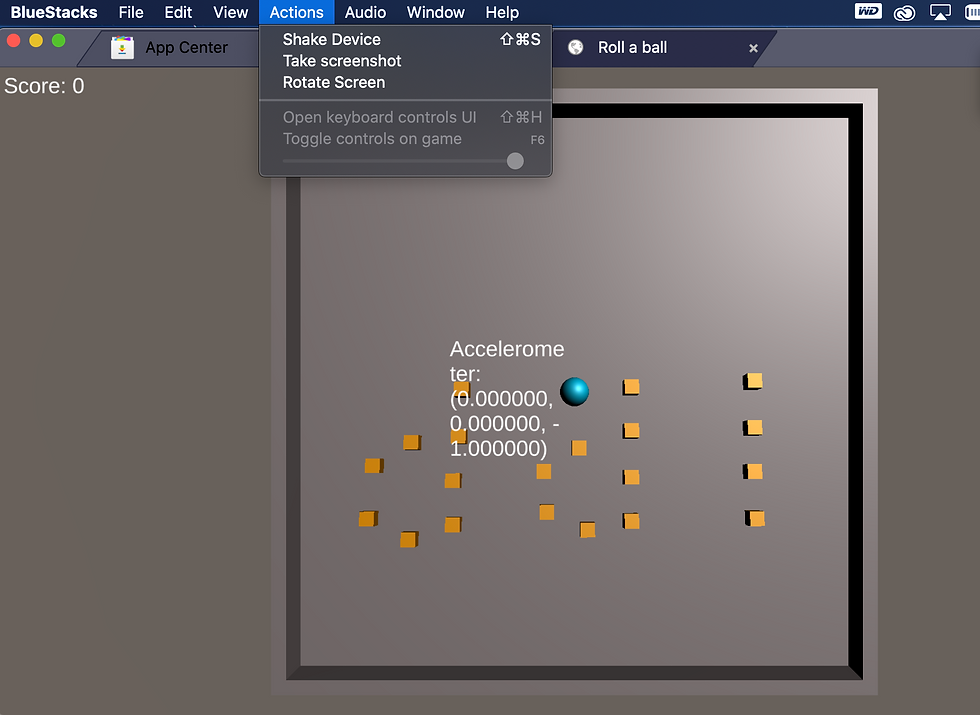
But, when clicking on the shake device option, I’ve noticed that the Accelerometer and the gyroscope were working fine because the value changed, and the ball moved.
But, I really wanted to try the game on a phone, so I borrowed my roommate's Android and I obtained the following results :
The ball does move and the gyroscope seems to be working, but I think that the speed of the ball could be fixed because it seems to be very slow.
And for some reason, the play ground is upside down although it's in the right position on Unity.


Commentaires